Hawaii OSDS Technology Suitability Analysis
Project Wrap-Up
2026-05-03
Introduction
Objectives
To be filled in.
Key Endpoints
- Download Datasets
- Prepare Input Data
- Build MPAT
- Screen Techs
Methods
Methods overview
Four notebooks chain in numerical order:
- Download Datasets (notebook 00) →
data/01_inputs/source/ - Prepare Input Data (notebook 01) →
data/01_inputs/prepared/ - Build MPAT (notebook 02) →
data/03_processed/mpat/ - Screen Techs (notebook 03) →
data/03_processed/tech_screening/
Each section that follows covers one endpoint with a title, inputs, processing, outputs, and resources.
Download Datasets
The notebook fetches the source layers used in the parcel suitability analysis (parcels, hydrology, soils, building footprints, regulatory boundaries, cesspool inventory) into a staged source directory.
Download Datasets — Inputs
15 source layers in 5 categories:
- Hydrology (water table, streams, wells, rainfall)
- Soils
- Topography (DEM, slope)
- Parcels and buildings (parcels, footprints, cesspool inventory)
- Regulatory (coastline, SMA, flood zones)
Download Datasets — Processing
- Import modules and helper functions
- Specify project and raw source data directory paths
- Specify data source links per download method type
- Download all data or individual data layers
Download Datasets — Resources
- Notebook:
00_download_input_layers.ipynb - Helper functions:
src/download_input_layers.py - Source directory:
data/01_inputs/source/
Prepare Input Data
The notebook reprojects, mosaics, and converts source layers into a single set of analysis-ready files at a common CRS.
Prepare Input Data — Inputs
- Source folder:
data/01_inputs/source/ - See: Download Datasets — Outputs
Prepare Input Data — Outputs
- Prepared folder:
data/01_inputs/prepared/ - CRS: EPSG:32604
- Rasters: rainfall, DEM, slope, watertable
- Vectors: building footprints, cesspool inventory, coastline, flood zones, parcels, SMA, soils, streams, domestic wells, municipal wells
Prepare Input Data — Processing
- Import modules and helper functions
- Specify configurations (target CRS)
- Specify project and data directory paths
- Build file paths to each source input and matching output
- Prepare all or individual layers
Prepare Input Data — Resources
- Notebook:
01_prepare_input_layers.ipynb - Helper functions:
src/prepare_input_layers.py - Prepared directory:
data/01_inputs/prepared/
Build MPAT
The notebook joins the prepared layers into a single per-parcel attribute table for the pilot islands (Maui, Oahu, Kauai). One row per cesspool-bearing parcel, sampled at one analysis point per parcel.
Build MPAT — Inputs
- Prepared folder:
data/01_inputs/prepared/ - CRS: EPSG:32604
- Same raster and vector list as Prepare Input Data outputs.
- See: Prepare Input Data — Outputs
Build MPAT — Processing
- Set up (configs, paths, inputs dict)
- Load and filter cesspools (class IV, OSDS > 0, pilot islands)
- Filter and dissolve parcels (one row per TMK)
- Process building footprints (TMK assignment, per-parcel aggregation)
- Define parcel analysis points (largest footprint centroid, else parcel centroid)
- Compute spatial attributes at analysis points (SMA, flood, soils, coast, streams, wells, raster sampling)
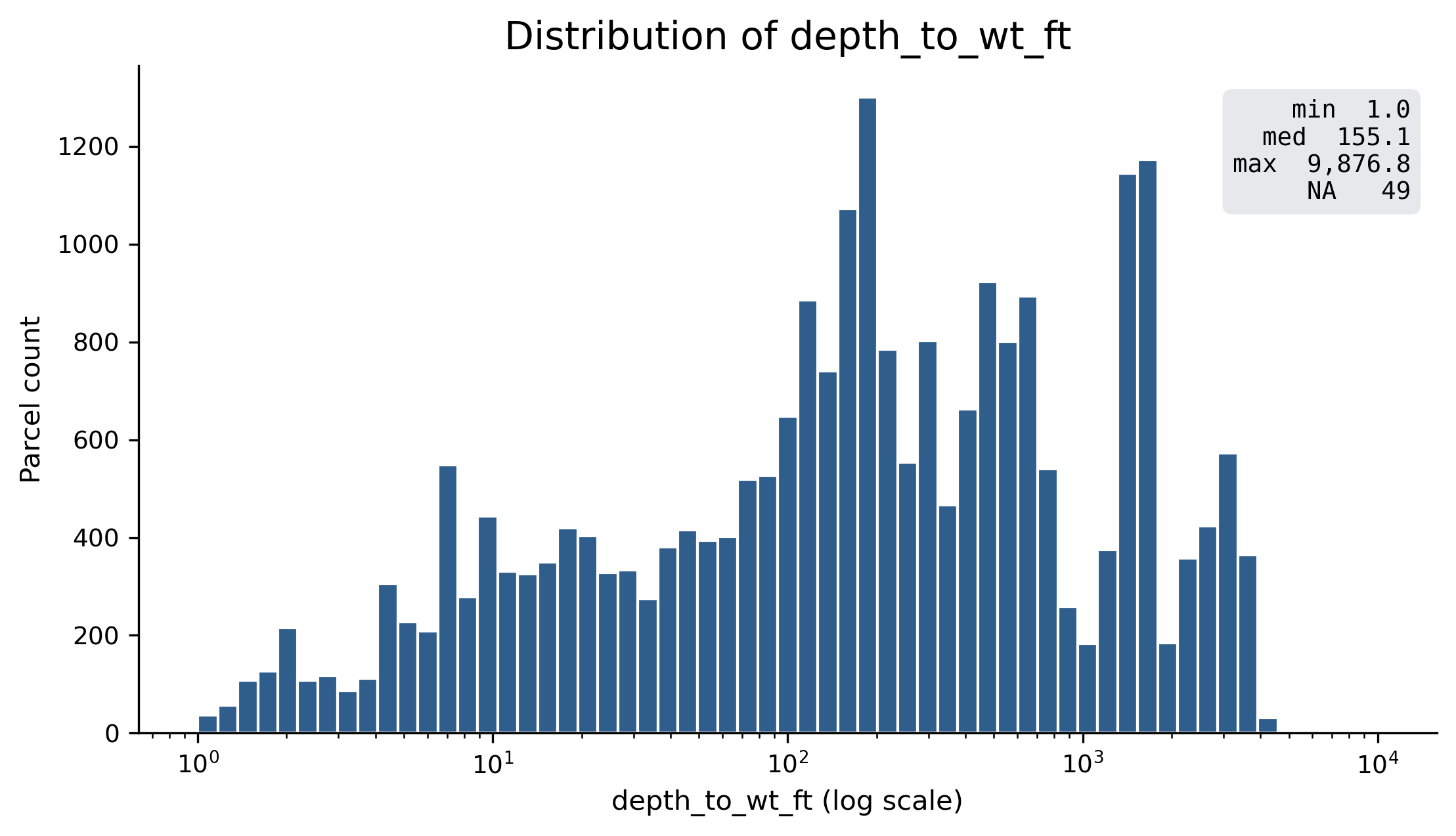
- Assemble MPAT (merge, derive
depth_to_wt_ftandnet_parcel_area_sqft) - Export GeoPackage and CSV
Build MPAT — Outputs
- MPAT:
data/03_processed/mpat/20260428_mpat_32604.gpkg - CSV mirror:
data/03_processed/mpat/20260428_mpat.csv - README:
data/03_processed/mpat/README.md - Parcel analysis points:
data/03_processed/20260428_parcel_analysis_points.gpkg - GitHub:
data/03_processed/mpat/
Build MPAT — Resources
- Notebook:
02_built_mpat.ipynb - Helper functions:
src/build_mpat.py - Validation:
src/validate_mpat.py
Screen Techs
The notebook applies HAR 11-62 site suitability criteria to the MPAT and assigns each parcel a set of recommended cesspool replacement technologies.
Screen Techs — Inputs
- MPAT:
data/03_processed/mpat/20260428_mpat_32604.gpkg - Configuration source:
HCPT_Matrix_v6.1.xlsx(editable Excel) - Configuration runtime files (YAML, derived via
src/export_config.py): - Full reference: Configuration Reference (Thresholds, Criteria, Endpoint Rules tables)
Screen Techs — Processing
- Set up (paths, output names)
- Load MPAT and configuration
- Feature engineering (
perc_est,dist_to_nearest_well_ft) - Pass 1: criteria evaluation (per-parcel pass/fail per criterion)
- Pass 1: endpoint screening (PASS or EXCLUDE per parcel × endpoint)
- Pass 2: display filters (mark some PASS as HIDDEN)
- Planning flags and output category (
CAT_1,CAT_2,CAT_3,CAT_LAST_RESORT,CAT_SUPPLEMENT_ONLY) - Build per-parcel summary and export
Screen Techs — Endpoints
15 endpoints: 13 primary treatment + disposal combinations (E01–E13) plus 2 eco supplements (ES1, ES2). Examples:
- E01: Standard Septic Tank + Standard Leach Field
- E07: NSF 40 ATU + Seepage Pit
- E11: NSF 245 ATU + Subsurface Drip Irrigation
- E13: Composting or Incinerating Toilet
- ES1: Bioreactor Garden
- ES2: Constructed Wetland
Screen Techs — Outputs
- Result GeoPackage:
data/03_processed/tech_screening/20260428_tech_screening_32604.gpkg - CSV mirror:
data/03_processed/tech_screening/20260428_tech_screening.csv - README:
data/03_processed/tech_screening/README.md
Screen Techs — Resources
- Notebook:
03_screen_techs.ipynb - Screening helpers:
src/screen_techs.py - Config exporter:
src/export_config.py - Configuration folder:
config/baseline/
Results
MPAT
| Measure | Kauai | Maui | Oahu | Total |
|---|---|---|---|---|
| Parcels | 9,994 | 7,505 | 9,725 | 27,224 |
| Cesspools | 13,779 | 10,337 | 10,026 | 34,142 |
- Output date: 2026-04-28
- CRS: EPSG:32604
- Pilot islands: Maui, Oahu, Kauai
Technology Recommendations
27,224 parcels were screened across 15 endpoints and assigned to 5 output categories.
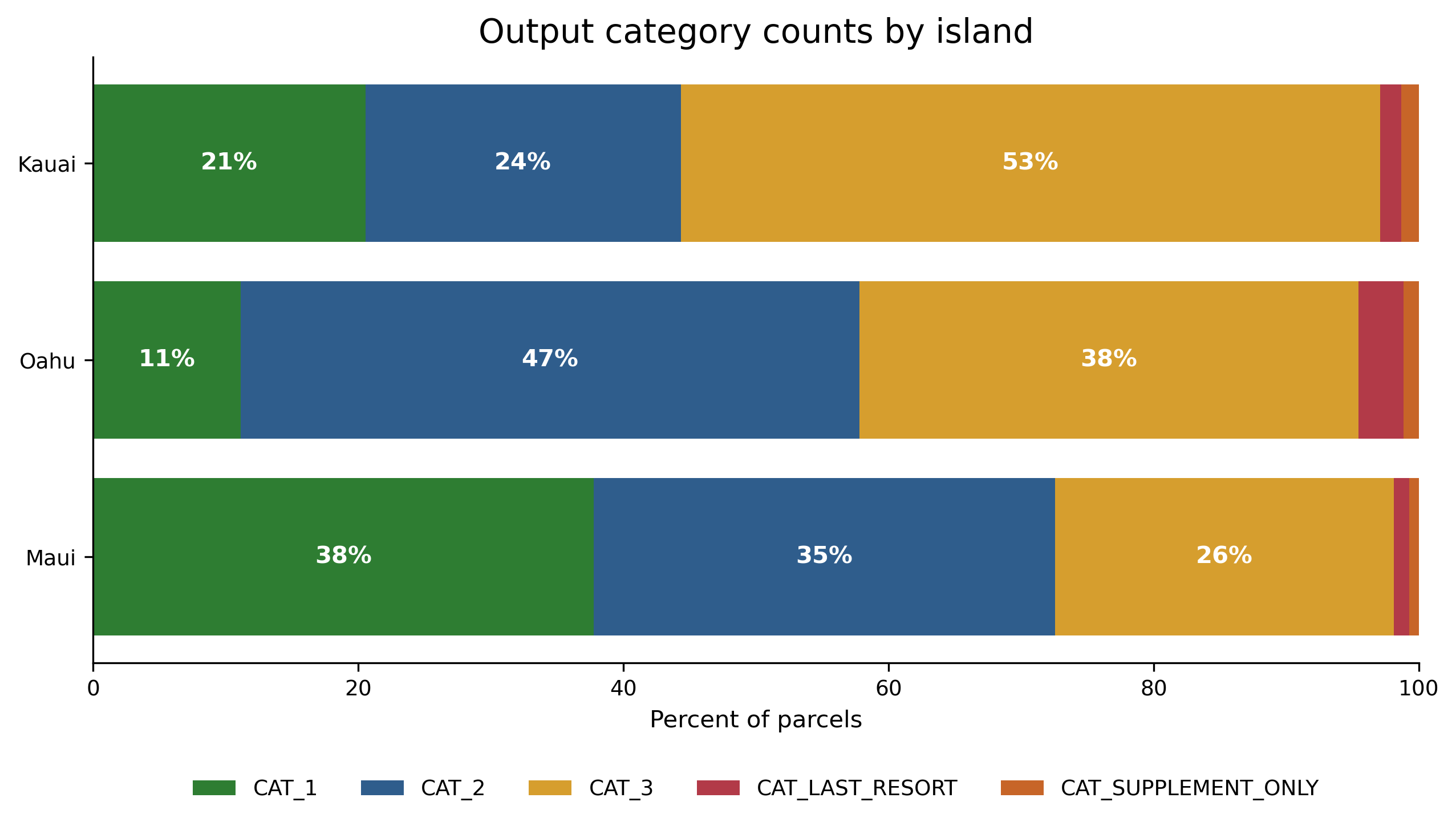
Output category counts by island.
Guide to Key Resources
Resources overview
Three places to find what:
- GitHub. Code, configuration, notebooks, this documentation site.
- Google Drive. Source data, prepared layers, processed outputs.
- InfoWRRC ArcGIS Online. Published web maps and view layers.
GitHub Repository
Shared Google Drive
InfoWRRC ArcGIS Online
Questions and next steps
- Pilot scope. Big Island and the smaller islands pending.
- DOH verification. Three thresholds (
well_domestic_ft,well_seepage_ft,sfha_flag) await DOH input. See Start Here for the working assumptions. - Web map. The Hawaii OSDS Technology Suitability Analysis Map (Pilot) is live with current outputs. Future work includes the narrative templates (T01–T11) for property owner communication.